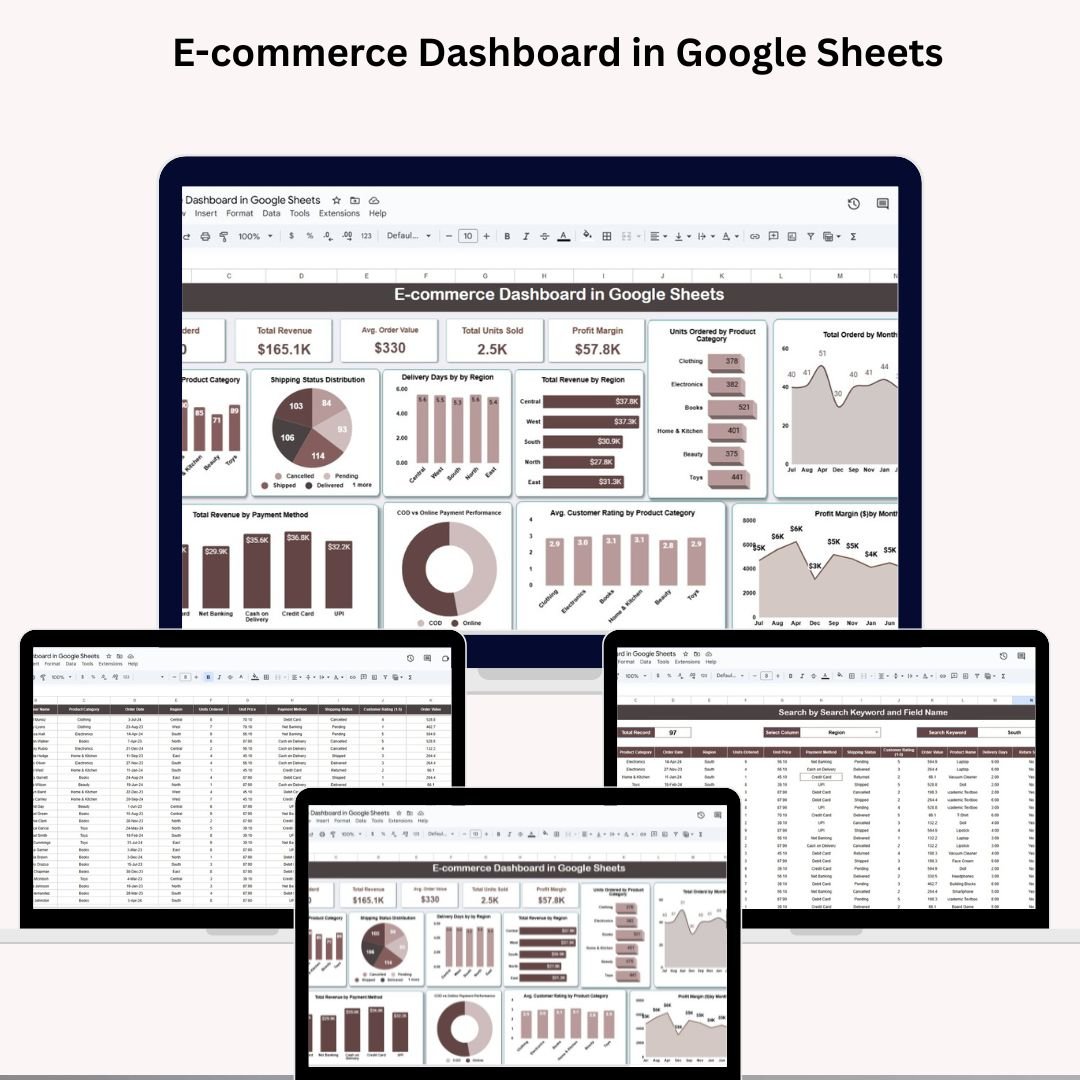
Running an online business without performance insights is like flying blind. That’s why the E-commerce Dashboard in Google Sheets is a game-changer! Designed for e-commerce entrepreneurs, marketers, and analysts, this ready-to-use dashboard helps you monitor key sales metrics, customer trends, product performance, and much more — all in one centralized, visual tool. �� Whether you’re selling fashion, gadgets, groceries, or digital goods, this dashboard helps you make smarter, data-driven decisions — straight from your browser, no coding or software needed! ✅ E-commerce Dashboard in Google Sheets �� Key Features of the E-commerce Dashboard in Google Sheets �� Dynamic Dashboard Tab �� Total Ordered – See how many orders your store is fulfilling �� Total Revenue – Instantly monitor your earnings �� Avg. Order Value – Know your customer spend habits �� Total Units Sold – Track the product volume moved �� Profit Margin – Calculate your profitability in real-time �� Powerful Visual Charts ��️ Orders by Product Category �� Shipping Status breakdown �� Delivery Days by Region �� Revenue by Region �� Units Ordered by Category �� Monthly Order Trend �� Monthly Profit Margin ⭐ Customer Rating by Category �� COD vs Online Payment comparison �� Revenue by Payment Method With these visuals, you’ll always know which products perform best, which regions are your goldmine, and which payment method drives revenue. �� What’s Inside the E-commerce Dashboard in Google Sheets �� Dashboard TabThe main tab features interactive cards and charts for tracking business health at a glance. �� Search TabUse built-in filters to find specific orders by: Region Order ID Payment Method Shipping Status Product CategoryThis makes analyzing a single slice of your data simple and efficient. �� Data TabThis is your input powerhouse! Just add new rows with fields like: Order ID Customer Name Order Date Region Units Ordered Unit Price Product Category Payment Type Shipping Status Delivery Days Rating Profit Margin Your dashboard and charts will update automatically. �� ���� How to Use the E-commerce Dashboard in Google Sheets 1️⃣ Enter Order Data – Add new orders in the Data tab.2️⃣ View Dashboard – Navigate to the Dashboard tab to explore auto-updated insights.3️⃣ Filter with Search – Use the Search tab to drill down by any field.4️⃣ Customize Freely – Add new fields or adjust formulas to suit your store.5️⃣ Share Easily – Collaborate live with your team or share it with stakeholders. Everything runs in your Google account. No installation. No cost. No hassle. �� �� Who Can Benefit from This Dashboard? ��️ E-commerce Store Owners – Track sales and customer trends�� Product Managers – Identify high-performing products�� Digital Marketers – Analyze ROI by category or campaign�� Finance Teams – Monitor margins and revenue by payment type���� Operations Managers – Improve delivery efficiency�� Startup Founders – Scale your online business with visibility�� Freelancers & Consultants – Use as a reporting tool for clients If you sell online—this is for you. �� �� Why Choose This Google Sheets Dashboard? ✔️ All-in-One View – Cards, charts, filters & search in one tab✔️ Real-Time Sync – Instantly reflects any new order entered✔️ Customizable Layout – Modify fields, visuals & structure✔️ Zero Learning Curve – Clean, no-code spreadsheet design✔️ Cloud Collaboration – Share & edit live with your team✔️ Perfect for Small & Growing Businesses✔️ Budget-Friendly – No expensive software needed �� Click here to read the Detailed blog post Click here to read the Detailed blog post �� Visit our YouTube channel to learn step-by-step video tutorials �� Youtube.com/@NeotechNavigators Watch the step-by-step video tutorial:


 Import UK
 Import Germany
 Import UK
 Import UK