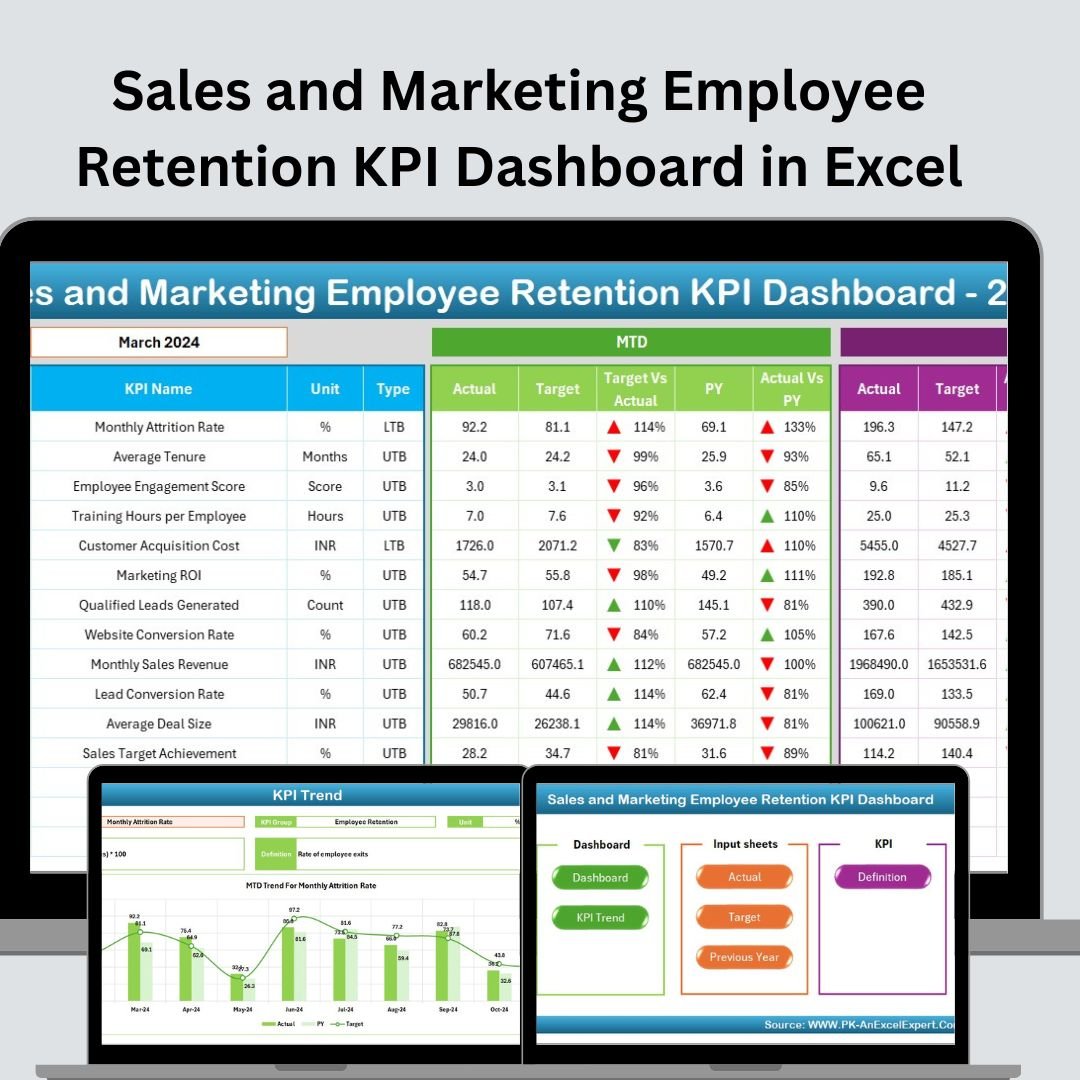
The Sales and Marketing Employee Retention KPI Dashboard in Excel is an essential tool designed for HR professionals, sales, and marketing managers to track and improve employee retention within their teams. This Excel-based dashboard focuses specifically on the sales and marketing sectors, where employee retention is crucial for maintaining a motivated workforce and sustaining business growth. The dashboard provides real-time insights into key performance indicators (KPIs) such as turnover rates, engagement levels, and retention factors, helping businesses monitor the health of their teams. By using this dashboard, you can identify at-risk employees, assess engagement, and implement data-driven strategies to improve retention rates, all while aligning with your overall business objectives. Key Features of the Sales and Marketing Employee Retention KPI Dashboard in Excel �� Employee Turnover Rate MonitoringTrack employee turnover in your sales and marketing teams. Monitor monthly and yearly turnover rates to identify trends and understand why employees are leaving. �� Employee Engagement TrackingMonitor employee engagement scores through surveys, feedback, and performance metrics. This helps in identifying how satisfied and committed employees are to the organization. �� Retention Strategy PerformanceTrack the effectiveness of your retention strategies by comparing employee turnover and engagement levels before and after interventions. Measure the success of initiatives aimed at improving employee retention. �� High-Risk Employee IdentificationUse the dashboard to identify employees who are at risk of leaving. Track performance, engagement, and tenure to pinpoint potential retention risks and take proactive action. �� Team Performance & ProductivityMonitor the performance and productivity levels of your sales and marketing teams. Understand how retention efforts affect team success and align retention strategies with business goals. ⚙️ Customizable KPIs & MetricsCustomize the dashboard to track specific KPIs that align with your organization’s goals. Add additional metrics, such as compensation data, training hours, or team-specific retention factors. Why You’ll Love the Sales and Marketing Employee Retention KPI Dashboard in Excel Sales and Marketing Employee Retention KPI Dashboard ✅ Efficient Employee Retention ManagementEffortlessly track employee turnover, engagement, and retention efforts. Use real-time data to make proactive decisions to retain top talent in your sales and marketing teams. ✅ Improve Engagement & SatisfactionMonitor employee satisfaction and engagement in real time. Take action based on the insights gained to improve retention and create a positive work environment. ✅ Data-Driven Decision MakingUse the data gathered through the dashboard to inform decisions on retention strategies, training programs, and team-building activities. ✅ Track Retention Strategy EffectivenessMeasure the impact of your retention programs by comparing turnover rates and engagement levels over time. Refine your strategy based on data insights to enhance results. ✅ Scalable & Customizable for Your NeedsWhether you’re managing a small sales team or overseeing a large marketing department, this dashboard is fully customizable to suit your specific business needs. What’s Inside the Sales and Marketing Employee Retention KPI Dashboard in Excel? Employee Turnover Rate Tracking: Monitor monthly and yearly turnover in your teams. Employee Engagement Scores: Track engagement levels through surveys and feedback. Retention Strategy Effectiveness: Measure the success of your retention programs. High-Risk Employee Identification: Identify employees at risk of leaving. Team Performance Monitoring: Track team performance and align retention efforts with business goals. Customizable KPIs: Tailor the dashboard to fit your business’s specific needs. How to Use the Sales and Marketing Employee Retention KPI Dashboard in Excel 1️⃣ Download the Template: Instantly access the Sales and Marketing Employee Retention KPI Dashboard in Excel.2️⃣ Input Employee Data: Enter turnover rates, engagement scores, and team performance metrics.3️⃣ Monitor KPIs: Track employee turnover, engagement, and retention strategies.4️⃣ Identify High-Risk Employees: Use the dashboard to pinpoint employees at risk of leaving.5️⃣ Optimize Retention Strategies: Use data insights to improve your employee retention strategies and business outcomes. Who Can Benefit from the Sales and Marketing Employee Retention KPI Dashboard in Excel? �� HR Professionals & Employee Relations Managers�� Sales Managers & Marketing Directors�� Business Owners & Executives�� Small & Medium Enterprises (SMBs)�� Large Corporations with Sales & Marketing Teams�� Recruitment & Retention Specialists�� Employee Engagement Consultants Improve employee retention and optimize your workforce with the Sales and Marketing Employee Retention KPI Dashboard in Excel. Track key metrics, engage employees, and make data-driven decisions to enhance your team’s success and business growth. Click here to read the Detailed blog post Visit our YouTube channel to learn step-by-step video tutorialsYoutube.com/@PKAnExcelExpert Watch the step-by-step video Demo:


 Import UK
 Import Germany
 Import UK
 Import UK