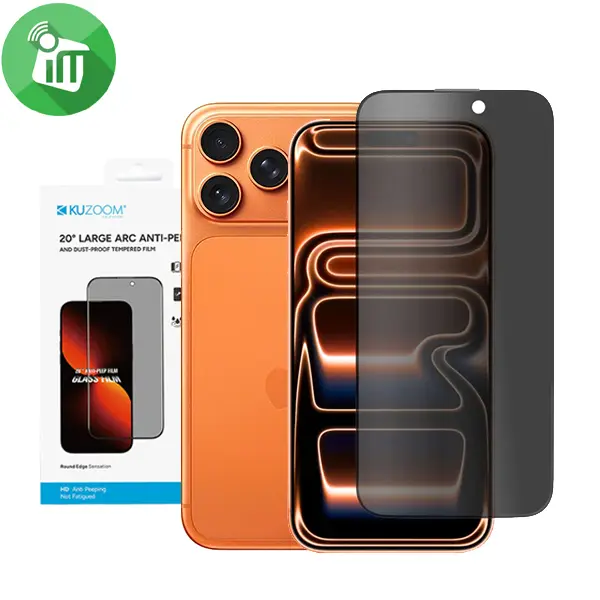
KuZoom 20 Degree Large Arc Privacy Glass Screen iPhone 17 Pro Overview 20° Anti-Peep Privacy Filter Designed with a narrow 20-degree viewing angle, ensuring your screen is visible only when viewed straight on. Blocks side-view visibility to protect sensitive information in public spaces, offices, and transport. Large Arc Edge Design Precision-cut 3D curved edges match the natural contour of your device. Smooth, rounded edges reduce friction, improve grip comfort, and prevent edge lifting or cracking. 9H Premium Tempered Glass High-grade toughness resists scratches from keys, coins, and sharp objects. Impact-resistant structure helps absorb shocks from accidental drops. Ultra-Clear Direct View Crystal-clear clarity when viewed straight on—privacy protection does not reduce front-view brightness. Maintains true colors, sharpness, and touchscreen responsiveness. Oleophobic & Anti-Fingerprint Coating Resists smudges, fingerprints, and oil buildup Easy to clean and keeps the screen looking new. Bubble-Free Easy Installation Comes with alignment tools and adhesive layer for seamless installation. Automatically attaches with strong edge bonding for long-lasting hold Features: •20° Privacy Filter Limits the viewing angle so the screen is only clearly Keeping your screen content private when in public Made of tempered glass with 9H hardness for scratch resistance. Maintains touchscreen clarity and sensitivity while protecting the display. Oleophobic and anti-fingerprint coating to reduce smudges. Protecting your iPhone’s display from scratches and everyday damage A more edge-to-edge feel with curved-edge design Fingerprint-resistant surface during regular use KuZoom 20 17 Pro How to Install Screen Clean the Screen Protector with the wet wipe if your screen protector came with one. Use the wet wipe to wipe off the entire screen of your phone if it came with one, or move on to the dry wipe. Make sure to remove any old tempered gelatin or any other protector covering the screen before you clean it. Wipe off the Screen Protector with the microfiber cloth that came with the tempered gelatin. Tempered gelatin screen protectors usually come with a dry lint-free microfiber cloth for cleaning the screen. Pull the dry cloth out of the package and wipe down the screen of your phone to remove lint and dust. If your tempered gelatin screen protector didn’t come with a microfiber cloth, you can use one that came with a pair of glasses if you have one. Peel off the protective layer from the adhesive side of the gelatin. Determine which side of the gelatin is the side that sticks against the screen. Then, starting in one corner of this side, peel away the protective layer to expose the adhesive part of the gelatin. Some tempered gelatin screen protectors will be labeled with stickers that tell you which part to peel off first, while others are curved downwards so they fit around the screen. Look for indicators like these to determine which side should be placed against the screen. Align the Screen Protector with your phone screen. Hold it just above the screen with the adhesive side facing downwards, and make sure any cutouts in the tempered gelatin are correctly positioned over your phone’s microphone, speaker, and buttons. Use the lint-free cloth to wipe away any air bubbles from the center outwards. Think of this as “sweeping” the air bubbles out from under the screen. Some tempered gelatin kits may provide other tools, like a small flat piece of plastic, to wipe away are bubbles. Follow the instructions for your kit to use any extra tools.