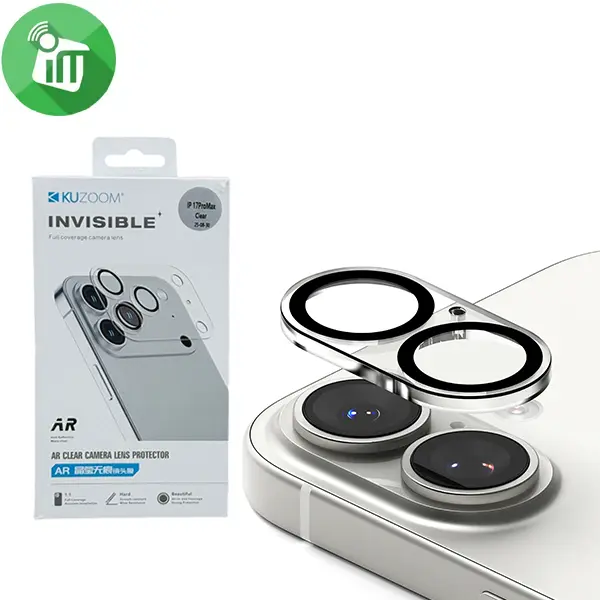
KuZoom AR invisible Camera Screen Glass iPhone 17 Overview Anti-Reflective (AR) Coating Reduces glare and flash reflections for clearer photos and better video quality, even in bright conditions. Invisible Ultra-Clear Design Maintains original camera look and doesn’t noticeably change how photos/videos appear. 9H Hardness Tempered Glass Provides strong resistance to scratches, drops, and everyday wear. Oleophobic (Anti-Fingerprint) Coating Helps keep the camera surface clean and smudge-free. Full Coverage Protection Covers all individual lenses and the surrounding camera bump area, minimizing dust/debris entrance. High Transparency Designed so light passes through with minimal distortion preserving clarity and sharpness of photos and videos. ANTI-GLARE & ANTI-REFLECTIVE Take stunning glare-free photos with Glass anti-glare and anti-reflective coating dispersing light to deliver enhanced color depth and clarity in every shot ENHANCED CAMERA PROTECTION Safeguard your iPhone camera lenses stronger Glass technology. This protector shields against scratches, impacts, and everyday wear ensuring your camera lens cover stays pristine PRECISE FIT & EASY INSTALLATION Engineered to fit the lens protector blocks dust and debris Easy installation and includes. Features: Tempered Glass 9H hardness Screen Protector Protect your camera lenses from impact scratches rough surfaces or the contents of your bag or pocket. Glass lens protection fits precisely to protect. Anti-reflective technology eliminates glare lets you see everything in rich, vibrant color. HD Clear & Ultra Thin 0.33 mm thickness Highly durable & scratch resistant & Anti-Shock & Anti-Fingerprint KuZoom invisible iPhone 17 How to Install Screen Clean the Screen Protector the wet wipe if your screen protector came with one. Use the wet wipe to wipe off the entire screen of your phone if it came with one, or move on to the dry wipe. Wipe off the Screen Protector the microfiber cloth that came with the tempered gelatin. Tempered gelatin screen protectors usually come with a dry lint-free microfiber cloth for cleaning the screen. Pull the dry cloth out of the package and wipe down the screen of your phone to remove lint and dust. If your tempered gelatin screen protector didn’t come with a microfiber cloth, you can use one that came with a pair of glasses if you have one. Align the Screen Protector with your phone screen. Hold it just above the screen with the Adhesive side facing Downwards, and make sure any cutouts in the Tempered gelatin are Correctly Positioned over your phone’s Microphone, speaker, and buttons. Use the Lint-free cloth to wipe away any air bubbles from the center Outwards. Think of this as “Sweeping” the air bubbles out from under the screen. Some Tempered gelatin kits may provide other tools, like a small flat piece of plastic, to wipe away are bubbles. Follow the instructions for your kit to use any Additional tools. SKU: 60117281 Category: Screen Protectors Tags: AR, camera, Glass, Invisible, iPhone 17, KuZoom, Screen Brand: KuZoom